In Part 2, we designed an MCP server for the YEG & Tell Library, a fictional library with an Azure SQL database of books: four tools, two resources and a prompt. In this post, we build it in C# and test it locally, first with the MCP Inspector and then by chatting with it through GitHub Copilot in VS Code.
Testing also ended up changing the design. When I tested the prompt, it asked for something the database couldn’t answer, so I fixed the data and the tool, then tested again. I cover that near the end.
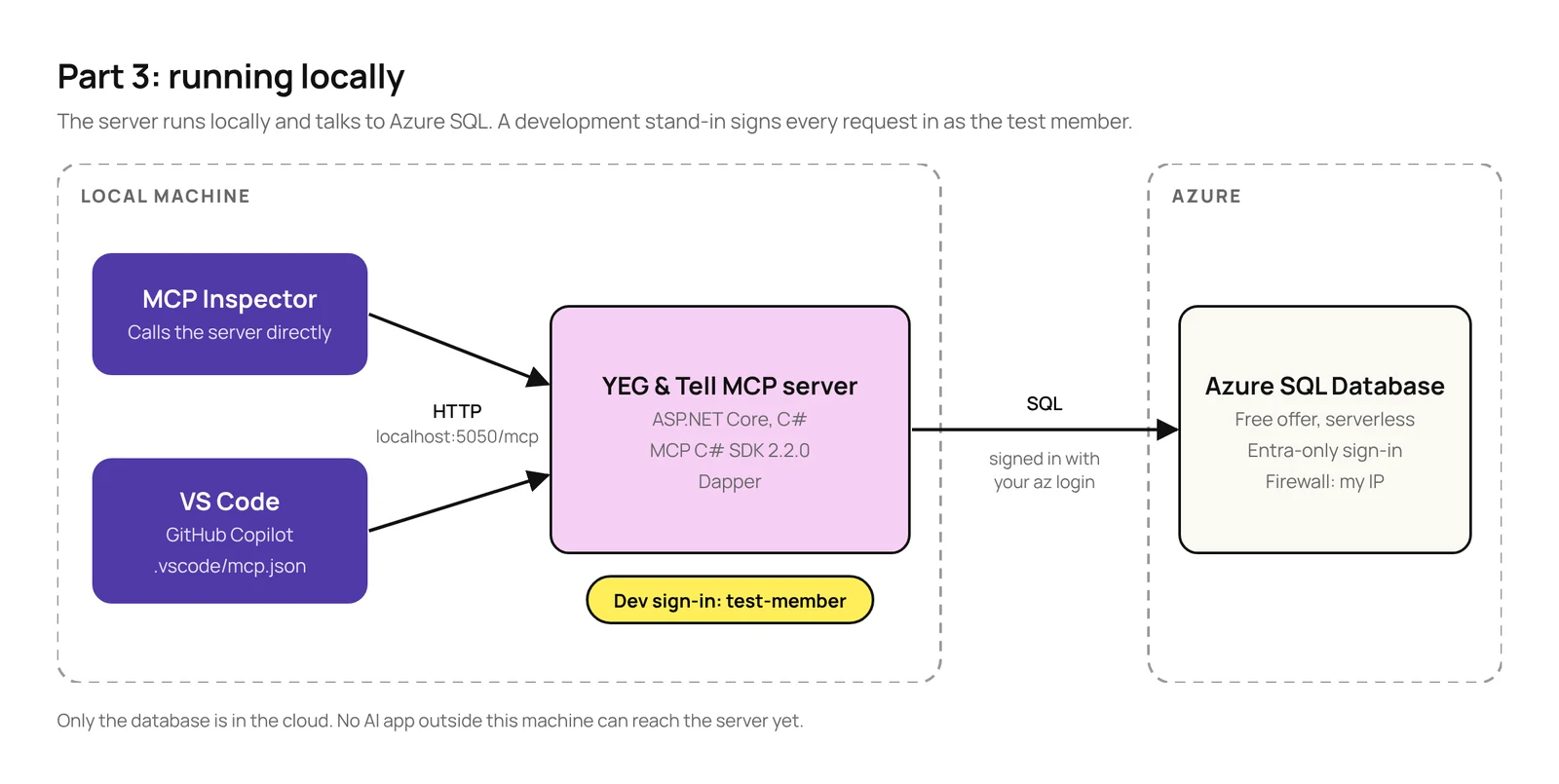
The database already lives in Azure, but the server itself runs locally for now, so only apps on the same machine can reach it. Moving the server to Azure and adding a proper sign-in come in Part 4. Until then, the server signs everyone in as a test member. The snippets in this post cover the important parts. The full code is in a private GitHub repo; if you’d like access, reach out to me on LinkedIn.
TL;DR
- The stack: ASP.NET Core with the official MCP C# SDK 2.2.0, Streamable HTTP and Azure SQL. I used Dapper so you can see the SQL each tool runs.
- Test without a model first: the MCP Inspector calls your tools directly. If a tool is wrong there, a model won’t fix it.
- Gotchas:
- Tools only get the user if the identity is authenticated. For local testing, sign in a test member with
authenticationType: "Development". - When a tool fails, the model only sees your error message if you throw
McpException. Any other exception gives it a generic error, so it can’t fix its call. - Signing in to Azure SQL with Microsoft Entra needs the
Microsoft.Data.SqlClient.Extensions.Azurepackage.
- Tools only get the user if the identity is authenticated. For local testing, sign in a test member with
- Test in the AI apps your users will use: not all of them support prompts, and each one decides on its own when to ask before running a tool. In VS Code, for example, GitHub Copilot never showed my prompt, Codex reserved a book without asking, and Claude asked even before a read-only search.
In this post
What we’re building
The server exposes what Part 2 designed, plus the two tools that Part 2 listed but didn’t show:
| Kind | Name | What it does |
|---|---|---|
| Tool | search_books | Searches by title or author, genre, status and age group, 10 books per page, with the total number of matches. |
| Tool | get_book_details | Full details for one book, including when it’s due back if it’s on loan. |
| Tool | reserve_book | Reserves a book for the signed-in member. |
| Tool | get_my_loans | The signed-in member’s loans and due dates. |
| Resource | library://policies/borrowing | Loan periods, borrowing limits and late fees. |
| Resource | library://programs/{programId} | A library program, such as summer-reading. |
| Prompt | recommend_books | Suggests available books in a genre for a reading level. |
Here’s how the pieces fit together for now. Everything except the database runs locally:

What you need
| What | Version I used | Why |
|---|---|---|
| .NET SDK | 10.0 | The server targets .NET 10. |
MCP C# SDK (ModelContextProtocol.AspNetCore) | 2.2.0 | Version 2.0.0 brought the SDK “into stable alignment with the MCP 2026-07-28 specification”. |
| Dapper | 2.1.89 | Data access with plain SQL. |
| Microsoft.Data.SqlClient | 7.1.1 | The SQL Server driver. |
| Azure CLI | 2.90 | To create the database. |
| Node.js | 24.22 | The MCP Inspector needs 22.19 or newer. |
| MCP Inspector | 2.12.0 | To call the server directly. |
| VS Code with GitHub Copilot | 1.142 | To test the server in chat. |
The database uses the Azure SQL Database free offer: 100,000 vCore seconds of serverless compute, 32 GB of data and 32 GB of backup storage per database per month. With the auto-pause option, which is the portal’s default and what the command below sets, the database pauses instead of billing when the free amount runs out, so following along costs nothing.
Step 1: Create the database
The server and database
I created everything with the Azure CLI. The server uses Microsoft Entra authentication only, so there’s no SQL user name or password anywhere, not even in the connection string:
az sql server create --resource-group rg-yeg-and-tell --name <your-server> `
    --location canadacentral --enable-ad-only-auth `
    --external-admin-principal-type User `
    --external-admin-name <your-upn> --external-admin-sid <your-object-id>

az sql db create --resource-group rg-yeg-and-tell --server <your-server> `
    --name yegandtell --edition GeneralPurpose --family Gen5 --capacity 2 `
    --compute-model Serverless --use-free-limit `
    --free-limit-exhaustion-behavior AutoPause
The first command failed on my subscription, which had never used Azure SQL before:
ERROR: (MissingSubscriptionRegistration) The subscription is not registered
to use namespace 'Microsoft.Sql'.
The fix is a one-off, free registration: az provider register --namespace Microsoft.Sql --wait. You’ll also need a firewall rule that lets your computer reach the server; az sql server firewall-rule create with your public IP address does it.
The tables
Seven tables: genres, books, members, loans, reservations, and two for the content behind the resources, policies and programs, each stored as Markdown text. I made three choices to keep the server code short:
- A book’s status is a column,
Available,OnLoanorReserved, rather than something worked out from loans and reservations. Searching by status is a simple filter, and reserving can check and update in one statement. - A book’s age group is a column too,
Children,TeenorAdult. I didn’t have it in the first version; I added it after testing, more on that later. - Members have a
SignInId, the ID the sign-in gives the server. For now that’stest-member. In Part 4, it becomes the member’s Microsoft Entra ID.
CREATE TABLE dbo.Books (
    Id      int IDENTITY PRIMARY KEY,
    Title   nvarchar(200) NOT NULL,
    Author  nvarchar(100) NOT NULL,
    GenreId int NOT NULL REFERENCES dbo.Genres (Id),
    Summary nvarchar(500) NOT NULL,
    Status  varchar(10) NOT NULL DEFAULT 'Available'
        CHECK (Status IN ('Available', 'OnLoan', 'Reserved')),
    AgeGroup varchar(10) NOT NULL DEFAULT 'Adult'
        CHECK (AgeGroup IN ('Children', 'Teen', 'Adult'))
);
The sample data has 45 real books in four genres. There are 16 self-help books, so a self-help search needs a second page, six by Malcolm Gladwell, and Dopamine Detox by Thibaut Meurisse is book 1. The test member, Ibn Battuta, has two books on loan.
Step 2: The data layer
The project is a plain ASP.NET Core web app with four main packages:
dotnet new web -n YegAndTell.Mcp -o src/YegAndTell.Mcp
dotnet add package ModelContextProtocol.AspNetCore --version 2.2.0
dotnet add package Dapper
dotnet add package Microsoft.Data.SqlClient
dotnet add package Microsoft.Data.SqlClient.Extensions.Azure
Note that you need the last package if you’re signing in to Azure SQL with Microsoft Entra. Since SqlClient 7.0, Microsoft moved Entra sign-in into a separate package. Microsoft’s release notes say apps using it “must now install the Microsoft.Data.SqlClient.Extensions.Azure NuGet package separately”. Without it, the connection string’s Authentication=Active Directory Default doesn’t work. The connection string itself goes in .NET user secrets, so it never ends up in the repo:
dotnet user-secrets set "ConnectionStrings:Library" `
  "Server=tcp:<your-server>.database.windows.net,1433;Database=yegandtell;Authentication=Active Directory Default;Encrypt=True;"
One more thing to watch for: when I built this, SqlClient 7.1.1 pulled in an older version of System.Security.Cryptography.Pkcs with two known vulnerabilities, so the project references the fixed version, 10.0.13, directly. dotnet list package --vulnerable --include-transitive is worth running on any new project.
LibraryDb is one class with a method for each thing the tools and resources need. Here’s the search. One query counts the matches and a second returns the page:
public async Task<SearchResult> SearchBooksAsync(string? text, string? genre,
    BookStatus? status, AgeGroup? ageGroup, int page, int pageSize, CancellationToken ct)
{
    const string sql = """
        SELECT COUNT(*)
        FROM dbo.Books AS b
        JOIN dbo.Genres AS g ON g.Id = b.GenreId
        WHERE (@text IS NULL OR b.Title LIKE '%' + @text + '%' OR b.Author LIKE '%' + @text + '%')
          AND (@genre IS NULL OR g.Name = @genre)
          AND (@status IS NULL OR b.Status = @status)
          AND (@ageGroup IS NULL OR b.AgeGroup = @ageGroup);

        SELECT b.Id, b.Title, b.Author, b.Status
        FROM dbo.Books AS b
        JOIN dbo.Genres AS g ON g.Id = b.GenreId
        WHERE (@text IS NULL OR b.Title LIKE '%' + @text + '%' OR b.Author LIKE '%' + @text + '%')
          AND (@genre IS NULL OR g.Name = @genre)
          AND (@status IS NULL OR b.Status = @status)
          AND (@ageGroup IS NULL OR b.AgeGroup = @ageGroup)
        ORDER BY b.Title
        OFFSET @skip ROWS FETCH NEXT @pageSize ROWS ONLY;
        """;

    var args = new
    {
        text, genre, status = status?.ToString(), ageGroup = ageGroup?.ToString(), pageSize,
        skip = (Math.Max(page, 1) - 1) * pageSize
    };

    await using var db = new SqlConnection(connectionString);
    using var results = await db.QueryMultipleAsync(
        new CommandDefinition(sql, args, cancellationToken: ct));

    var total = await results.ReadSingleAsync<int>();
    var books = (await results.ReadAsync<BookSummary>()).AsList();
    return new SearchResult(books, total);
}
Part 2 said reserve_book should do the whole task in one call. Inside it, the check and the reservation also happen in one statement, inside a transaction, so two people can’t reserve the same book at the same moment:
// Check and reserve in one statement: it only changes the book if it's available.
var title = await db.QuerySingleOrDefaultAsync<string>(new CommandDefinition("""
    UPDATE dbo.Books
    SET Status = 'Reserved'
    OUTPUT inserted.Title
    WHERE Id = @bookId AND Status = 'Available';
    """, new { bookId }, tx, cancellationToken: ct));
If nothing was updated, the method looks the book up and throws an McpException that says why and what to do next, such as “‘Blink’ can’t be reserved because it’s on loan. Use search_books with status Available to find another book.”
Step 3: The MCP server
Program.cs is short. The MCP registration is the same as in Part 2, plus MapMcp, which puts the MCP endpoint at /mcp:
using System.Security.Claims;
using YegAndTell.Mcp;

var builder = WebApplication.CreateBuilder(args);

var connectionString = builder.Configuration.GetConnectionString("Library")
    ?? throw new InvalidOperationException(
        "Set ConnectionStrings:Library in user secrets. See database/README.md.");
builder.Services.AddSingleton(new LibraryDb(connectionString));

builder.Services.AddMcpServer()
    .WithHttpTransport()
    .WithToolsFromAssembly()
    .WithResourcesFromAssembly()
    .WithPromptsFromAssembly();

var app = builder.Build();

// DEVELOPMENT ONLY: there's no sign-in yet, so every request is signed in
// as the test member. Part 4 replaces this with Microsoft Entra ID.
if (app.Environment.IsDevelopment())
{
    app.Use((context, next) =>
    {
        context.User = new ClaimsPrincipal(new ClaimsIdentity(
            [new Claim(ClaimTypes.NameIdentifier, "test-member")],
            authenticationType: "Development"));
        return next(context);
    });
}

app.MapMcp("/mcp");

app.Run();
The server runs at http://localhost:5050/mcp. I fixed the port in launchSettings.json so the test setup doesn’t change between runs.
A sign-in gotcha
The development stand-in only works because of authenticationType: "Development". In version 2.2.0, the SDK only passes the user on to your tools when the user is authenticated, and a ClaimsIdentity without an authentication type isn’t. If you leave it out, the SDK treats the user as not signed in, and reserve_book replies “You need to be signed in to reserve a book”.
The tools, resources and prompt
The tool, resource and prompt classes are the ones published in Part 2, including search_books with the age group filter that testing added. The two new tools follow the same rules: read-only, a clear description, and errors that say how to fix the problem. get_my_loans takes the member from the sign-in, like reserve_book, so it has no inputs at all:
[McpServerTool(Name = "get_my_loans", Title = "Get my loans",
    ReadOnly = true, OpenWorld = false)]
[Description("Lists the books the signed-in member has on loan, with " +
    "the date each one is due back.")]
public static async Task<IReadOnlyList<Loan>> GetMyLoans(
    LibraryDb db,
    ClaimsPrincipal user,
    CancellationToken ct = default)
{
    // The member comes from the sign-in, never from the model.
    var memberId = user.FindFirst(ClaimTypes.NameIdentifier)?.Value
        ?? throw new McpException(
            "You need to be signed in to see your loans.");

    return await db.GetMyLoansAsync(memberId, ct);
}
Step 4: Test with the MCP Inspector
The MCP Inspector calls your server directly, with no AI model involved. That’s why I test with it first: if a tool returns the wrong result here, a model won’t fix it. With the server running, start it with:
npx @modelcontextprotocol/inspectorChoose Streamable HTTP and connect to http://localhost:5050/mcp. The Tools tab shows each tool with the form the Inspector builds from its inputs and descriptions, and a READ-ONLY badge from the annotation:

Running it with the genre “self-help” returns the first 10 books and the total, the same shape we designed in Part 2:

Here’s everything I checked:
| Check | Result |
|---|---|
search_books with text “gladwell” | 6 books, totalMatches: 6 |
search_books with genre “self-help”, page 2 | The last 6 of the 16 books (page 1 had the first 10), totalMatches: 16 |
search_books with genre “self-hlep” | Error: “Unknown genre ‘self-hlep’. Valid genres are: children, fiction, non-fiction, self-help.” |
get_my_loans | Ibn Battuta’s two loans, with due dates |
reserve_book for book 1, twice | “Reserved ‘Dopamine Detox’ (book 1) for you.”, then an error saying it’s already reserved |
Read library://policies/borrowing | The borrowing policy, as Markdown |
Get recommend_books with self-help and adult | The prompt text, with both values filled in |
Error and schema behaviour to know about
If this is your first MCP server, these are easy to miss. You can see each one in the Inspector:
- The SDK adds a line in front of your error. If
search_booksthrowsMcpException("Unknown genre 'self-hlep'…"), the model sees “An error occurred invoking ‘search_books’: Unknown genre ‘self-hlep’…”. Your message arrives unchanged, so write it for the model, and there’s no need to repeat the tool name. - Other exceptions are hidden. An invalid enum value, like status “Lost”, fails before the tool even runs, and the model only sees “An error occurred invoking ‘search_books’.” That’s fine here, because the input schema already lists the valid statuses, but it’s another reason to throw
McpExceptionfor anything the model can fix. - Resource errors work differently. A missing program doesn’t come back as a tool result with an error flag. It’s a protocol-level error, with the
McpExceptionmessage passed through unchanged. - A schema warning. The Inspector warns that the optional inputs of
search_bookshave a type of “string or null”, which some AI apps’ function formats don’t support. VS Code and the Inspector accept it, so I’ve left it. I’ll come back to it if one of the apps in Parts 5 to 7 rejects the tool.
Step 5: Test in VS Code
The Inspector shows that the server works. To see what a real model does with it, I used GitHub Copilot in VS Code. VS Code reads MCP servers from .vscode/mcp.json in the project folder. With this file in place, VS Code knows about the local server. Start it from that file, and GitHub Copilot can use it:
{
  "servers": {
    "yeg-and-tell": {
      "type": "http",
      "url": "http://localhost:5050/mcp"
    }
  }
}
Note that in VS Code 1.142, the MCP: Add Server flow labels .vscode/mcp.json as deprecated. It still works, and VS Code forwards its servers to the GitHub Copilot harness. The newer portable files, .mcp.json in the project or ~/.copilot/mcp-config.json for you only, use mcpServers instead of servers.
Which part is the MCP client?
This confused me at first. In VS Code, the MCP client depends on which agent harness runs the chat, not on GitHub Copilot as a product. A harness is the layer that runs the agent session. Other AI extensions in VS Code bring their own client:
| Where you chat | What runs the agent | MCP client |
|---|---|---|
| VS Code chat, Local harness | VS Code’s extension host | VS Code. It ran my prompt. |
| VS Code chat, GitHub Copilot harness | The GitHub Copilot runtime, shared with GitHub Copilot CLI | GitHub Copilot’s runtime. Version 1.0.95 never listed my prompt. |
| VS Code chat, Claude harness | Anthropic’s Claude harness | The Claude harness. It asked before every tool, read-only or not. |
| VS Code chat, Codex harness | OpenAI’s Codex harness | The Codex harness. It ran every tool without asking, even reserve_book. |
| Claude Code extension | Claude Code | Claude Code, with its own config and permission rules |
| Codex extension | Codex | Codex, with its own config and approval modes |
You pick the harness from the Session Target control in the chat input, before your first message. Note that starting with VS Code 1.142, Microsoft is gradually making the GitHub Copilot harness the default for new sessions, so the same steps can open a different harness. That’s most likely why my first tests ran in the Local harness and the later ones in the GitHub Copilot harness. In the picker, it’s just called Copilot. To use Local, start a new chat in the Chat view and select Local from Session Target.

I then asked the questions from Part 2’s “Test your design” table in GitHub Copilot Chat. Unless I say otherwise, the tests below ran in the GitHub Copilot harness, with Manual permissions selected at the bottom of the chat, and GitHub Copilot routed them to GPT-6 Luna.
Searching
“Do you have anything by Malcolm Gladwell?” went straight to search_books with the text “gladwell”, and the model grouped the six books by status:

Reserving
“Reserve Dopamine Detox for me.” got two confirmations. First, the model asked on its own whether to go ahead. Then GitHub Copilot asked before running reserve_book, using the tool’s Title, “Reserve a book”, as the heading. The search before it ran without asking.
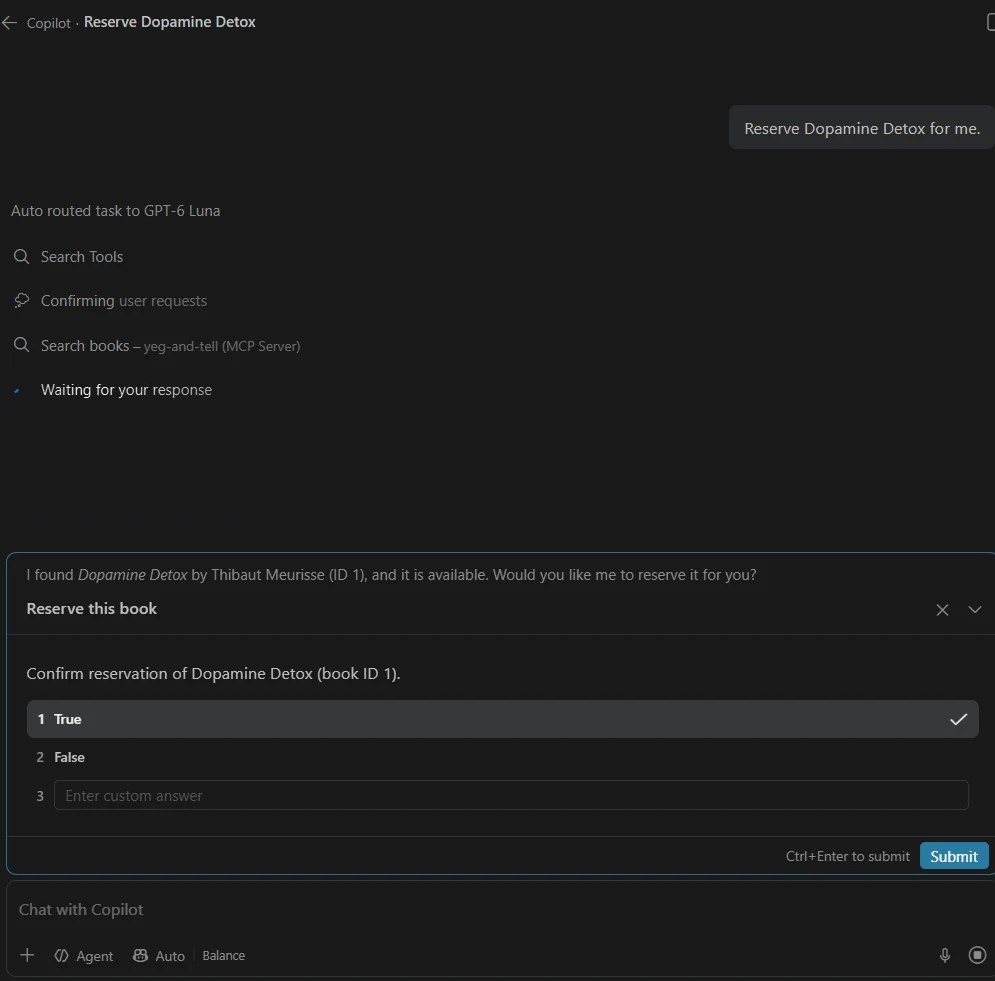

To check the Local harness too, I asked it to reserve any self-help book, with Default permissions. It behaved the same way: it ran search_books without asking and asked before reserve_book:

The Claude harness behaved differently. With Claude Haiku 5.5 and Ask Before Edits, it asked the first time each tool was used, including the read-only search_books and get_my_loans. Allow in this Session then covered only that tool:

The Codex harness went the other way. With GPT-5.2 and Default Permissions, it ran search_books, get_my_loans and reserve_book without asking at all. It only asked before running shell commands on my machine:

The documentation doesn’t say whether the Local or GitHub Copilot harness uses the ReadOnly annotation to decide when to ask, so I’m only describing what I saw: in both, the read-only tools ran without asking and reserve_book needed approval. The Claude harness clearly doesn’t skip read-only tools. So don’t count on ReadOnly to avoid approval prompts, or on ReadOnly = false to get one; each app has its own rules. Keep the checks that matter, like whether a book is available, in the server itself.
Recovering from a mistake
“Show me self-hlep books” sent the typo straight to search_books, which failed with the list of valid genres. The model retried with “self-help” and told the user what it had done. This is the “errors that explain the fix” idea from Part 2, and it worked with a real model:

Paging
“Any self-help books I can borrow now?” returned the first 10 of 13 (Dopamine Detox was now reserved from the earlier test). GPT-6 Luna chose not to fetch the rest: its visible reasoning was “I don’t think any additional tools are necessary right now”, and it told the user there were three more. When I said “show more”, it called search_books with page: 2:

Different models handle this differently. In an earlier test run in Claude Code 2.1.301, Claude Opus 5.5 fetched page 2 straight away because totalMatches was higher than the books returned, with the same tool and the same description.
My loans
“What do I have on loan?” called get_my_loans with no inputs. The member comes from the sign-in, so the model doesn’t need to know who is asking:

Attaching a resource
In VS Code, resources are under Add Context › MCP Resources. The server’s two resources are listed by their titles and descriptions, including the program template:

With the borrowing policy attached, “What’s the late fee?” was answered from the policy, with no tool call:

The prompt depends on the client
In Part 1, I mentioned that support for prompts is patchy across AI apps, and testing confirmed it. Prompts were the only feature that depended on the client, even in the same VS Code version (1.142). The Local harness, which runs inside VS Code itself, listed recommend_books and showed its argument form. The GitHub Copilot harness (GitHub Copilot CLI version 1.0.95, a pre-release build), which VS Code’s chat used in my later tests, never asked the server for prompts at all, so the prompt didn’t appear in its / menu. Tools worked in both, but prompts only worked in one. For the final test, I got the prompt from the Inspector and pasted its text into the chat:

What testing showed
The first time I ran recommend_books for children’s fiction, the model said: “the catalogue doesn’t identify age suitability, and I can’t confidently recommend five for children”. And it was right. The prompt asks for a reading level, and the database had nothing to match it against. There’s a children genre, with books like The Gruffalo and Matilda, but the prompt asked for fiction suited to children, and nothing on a fiction book said who it suited. A reading level sounded like a reasonable input for the prompt when I designed it, but the model can only work with what the tools return.
So I made the smallest fix I could:
- an
AgeGroupcolumn on each book:Children,TeenorAdult - an
AgeGroupenum, and an optionalageGroupinput onsearch_books - a dozen children’s and teen fiction books, so there was something to recommend
I left the prompt itself unchanged on purpose. It still only says “Pick five suited to children readers”. Then I ran the same test again. This time, the model called search_books with "ageGroup": "Children" on its own. Its visible reasoning said it needed to “make sure it fits the age group”:


This is what Part 2 meant by testing your design: ask realistic questions, find what the model can’t do, fix the design and test again. The fix wasn’t a better prompt. It was giving the tool the data and the input it needed, and a clear description did the rest.
What’s next
The server works, but only locally and only for a test member. In Part 4, we’ll deploy it to Azure and replace the test sign-in with Microsoft Entra ID, so Copilot Cowork, Claude and ChatGPT can reach it in Parts 5 to 7. You can follow the whole series on the MCP series page.

Sources
- MCP C# SDK releases
- MCP Inspector
- Microsoft Learn: Azure SQL Database free offer
- Microsoft.Data.SqlClient 7.0.0 release notes
- VS Code: MCP configuration reference
- VS Code: Add and manage MCP servers
- VS Code: Choose an agent harness
- VS Code 1.142 release notes
- Claude Code: Connect to tools via MCP
- Codex: MCP
A note on how this post was written: the experience, examples and voice are mine. The writing was enhanced with the help of AI.

Leave a Reply