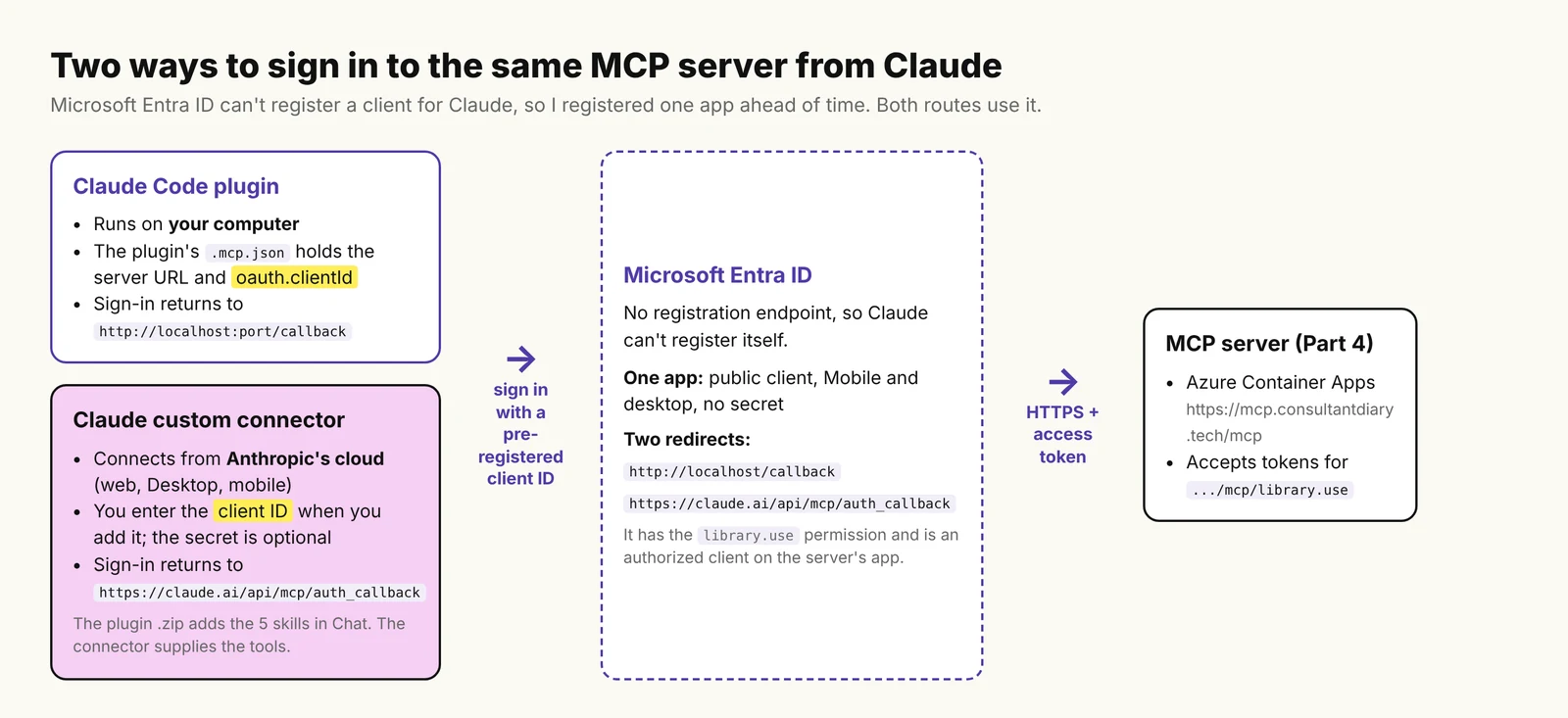
In Part 5, I turned the YEG & Tell Library, a fictional library, into a Copilot Cowork plugin. In this post, I connect the same MCP server to Claude in two ways: as a plugin for Claude Code, which runs on my computer, and as a custom connector in Claude on the web (claude.ai), which connects from Anthropic’s servers.
Both ran into the same thing as Part 5: Microsoft Entra ID can’t register a client for Claude, so I registered one myself first. ChatGPT comes in Part 7.
The full code is in a private GitHub repo; if you’d like access, reach out to me on LinkedIn.
TL;DR
- Claude can’t register itself with Entra ID. You register an app in Entra ID first and give Claude its client ID.
- One public app, with no secret, worked for both. Add two redirect URIs to it:
http://localhost/callbackfor Claude Code andhttps://claude.ai/api/mcp/auth_callbackfor claude.ai. - Claude Code: put the client ID in the plugin’s
.mcp.json, asoauth.clientId. claude.ai: add a custom connector with the client ID and leave the secret empty. - A plugin .zip adds the skills, not the sign-in. The skills are optional, but without them the model once searched with the wrong argument and my server returned all 45 books.
In this post
Why Claude can’t sign in on its own
The server from Part 4 tells a client to sign in with Entra ID. Claude’s connector authentication docs describe two ways Claude can register itself with an authorization server: a Client ID Metadata Document, or dynamic client registration (DCR). Entra’s discovery document lists neither. Microsoft says the same: “DCR isn’t available for an MCP server that’s protected by Microsoft Entra ID.”
So, as in Part 5, I register the client ahead of time and give Claude its client ID.

Step 1: Register an app in Entra ID
I first made two apps, one for Claude Code and one for the connector. Later I found that one public app, with no secret, works for both. This is the setup I’d use, single tenant:
| Setting | Value |
|---|---|
| Client type | Public client: platform Mobile and desktop applications, no secret |
| Redirect URI for Claude Code | http://localhost/callback |
| Redirect URI for the claude.ai connector | https://claude.ai/api/mcp/auth_callback |
- Claude’s docs say Claude Code uses a port that changes per session. Microsoft’s redirect URI page says the port is ignored for localhost, so this one entry is enough. The path,
/callback, has to match. - Anthropic’s support article says the connector’s callback may change to
https://claude.com/api/mcp/auth_callback. I only registered theclaude.aione on this app. - The app gets the delegated
library.usepermission, and I added it as an authorized client application on the server’s app registration, as I did for VS Code in Part 4. - I tested the Claude Code sign-in first, then added the claude.ai redirect and tested the connector. I didn’t repeat the Claude Code sign-in after that.
Step 2: The Claude Code plugin
The plugin folder is the one from Part 5: the skills in skills/ and the server in .mcp.json. At first, .mcp.json held only the server URL:
{
  "mcpServers": {
    "yeg-and-tell": {
      "type": "http",
      "url": "https://mcp.consultantdiary.tech/mcp"
    }
  }
}
I loaded it with claude --plugin-dir ./plugin, opened /mcp and chose Authenticate. It failed:
Issue: Incompatible auth server: does not support dynamic client registration
This service doesn't accept sign-ins from Claude Code. The plugin's author
can fix that by registering an app with the service.
Claude Code’s docs say this error means the server needs pre-configured credentials. So I added the client ID next to the URL:
{
  "mcpServers": {
    "yeg-and-tell": {
      "type": "http",
      "url": "https://mcp.consultantdiary.tech/mcp",
      "oauth": { "clientId": "<your-client-id>" }
    }
  }
}
This time Authenticate opened the browser, I signed in, and /mcp said: “Authentication successful. Connected to plugin:yeg-and-tell-library:yeg-and-tell.”

Claude Code’s docs show oauth.clientId in a claude mcp add-json example, but not for plugins. So I can only say it worked for me, on Claude Code 2.1.322.
If you don’t need the skills, you can add the server without a plugin:
claude mcp add --transport http --client-id <your-client-id> yeg-direct https://mcp.consultantdiary.tech/mcpStep 3: The custom connector in claude.ai
In Claude, on the web:
- Go to Plugins > Add > Add custom connector.
- Enter a name and the server URL,
https://mcp.consultantdiary.tech/mcp. Claude checks the server; for mine, it selected “Use your own OAuth client”. - Paste the client ID of the app. The secret field is optional, so I left it empty. Click Add, and sign in if Claude asks.
- With the secret empty, the connector showed Connected, and
search_booksandget_my_loansreturned results. I tested this once. claude.ai doesn’t allow two connectors with the same URL, so that test used the URL with?test=1on the end.
On my first try, with a separate Web app and a secret, the sign-in worked, but claude.ai showed “Server not responding”: “Your account was authorized, but YEG & Tell Library didn’t respond.”

I clicked Reconnect, and it connected. My guess is the cold start from Part 5, but I didn’t time it.
Step 4: Upload the plugin for the skills
This step is optional. The connector works without it, and the skills only change how Claude uses the tools. The connector gives Claude the tools, but not the skills. For the skills, I zipped the plugin folder, with .claude-plugin/plugin.json at the top of the zip, and uploaded it under Plugins > Add > Upload plugin. This zip has only the server URL, no client ID.
The plugin page showed the connector as Connected, and the five skills. I think it matched the connector I had already added, since the URL is the same.

In a new chat, I asked: “Recommend five available self-help books for adults from the YEG & Tell Library.” Claude used the connector and the recommend-books skill, and gave me five books.

Then I turned the connector off and asked again. The skill still loaded, but Claude said the search_books and get_book_details tools weren’t connected, and that any titles it gave would be guesses. So the zip brings the skills, not the sign-in. On claude.ai, add the connector first.

What testing showed in Claude Code
I asked the Part 5 questions in Claude Code, first with the server added directly and then through the plugin. All tests used Sonnet 5.5.
| Question | Server only, no skills | Plugin, with skills |
|---|---|---|
| “What do I have on loan?” | The first call timed out; the retry worked. | check-my-loans: “You have no books on loan right now.” |
| “recommend kids books” | Passed query instead of text; got all 45 books. | recommend-books: searched by genre, status and age group; four books. |
| “Any self-help books I can borrow now?” | Ten books. | find-a-book: nine books. I had reserved the tenth by then. |
| “What’s the late fee?” | Read the server’s borrowing policy resource: $0.25 a day, up to $5 per book. | library-info: the same numbers, from the skill’s own copy. |
| “Reserve Outliers” | Refused: already reserved. David and Goliath worked. | Refused: already reserved. The Tipping Point worked. |
Don’t read the table as a strict comparison. I asked the plugin questions in fresh chats and the others in one session, and my reservations changed the catalogue between runs.
The wrong argument
Without the skills, the model searched with query, but the tool’s parameter is text. My server ignored the unknown argument and returned the whole catalogue, so the first “recommend kids books” answer wasn’t a real search. With the plugin, the model used the right parameters. I haven’t changed the server yet, but it should reject an argument it doesn’t know.

Approvals
Claude Code asked me before it reserved a book. I chose Yes, and it reserved The Tipping Point.

If you want this to work for everyone
This setup needs a client ID that I registered. That’s fine for a sample, or for one company’s users, but not for a plugin anyone can install. Claude’s docs list the options: an authorization server that supports DCR or Client ID Metadata Documents, a client whose credentials Anthropic holds (for connectors in Anthropic’s directory), or each customer entering a client ID, as I did here. Entra doesn’t support the first, and I haven’t tried the second. Since the app has no secret, the client ID is the only thing users need, and claude.ai’s dialog calls it a public identifier, so it could go on a public page. My app is single tenant, so only accounts in my tenant can sign in. Real library members would need a different sign-in; I haven’t tried that.
Which one to use
| What to set up | What you get | |
|---|---|---|
| Claude Code | The plugin, with oauth.clientId in .mcp.json | The tools and the skills |
| claude.ai | The custom connector, with your client ID and no secret | The tools |
| claude.ai | The plugin .zip, after the connector | The skills |
What’s next
In Part 7, we connect the same server to ChatGPT. You can follow the series on the MCP series page.
Sources
- Claude Code docs: Connect Claude Code to tools via MCP
- Claude docs: Connector authentication
- Claude Help Center: Building custom connectors via remote MCP servers
- Microsoft Learn: Redirect URI (reply URL) outline and restrictions
- Microsoft Learn: Dynamic client registration for Copilot plugins
A note on how this post was written: the experience, examples and voice are mine. The writing was enhanced with the help of AI.

Leave a Reply