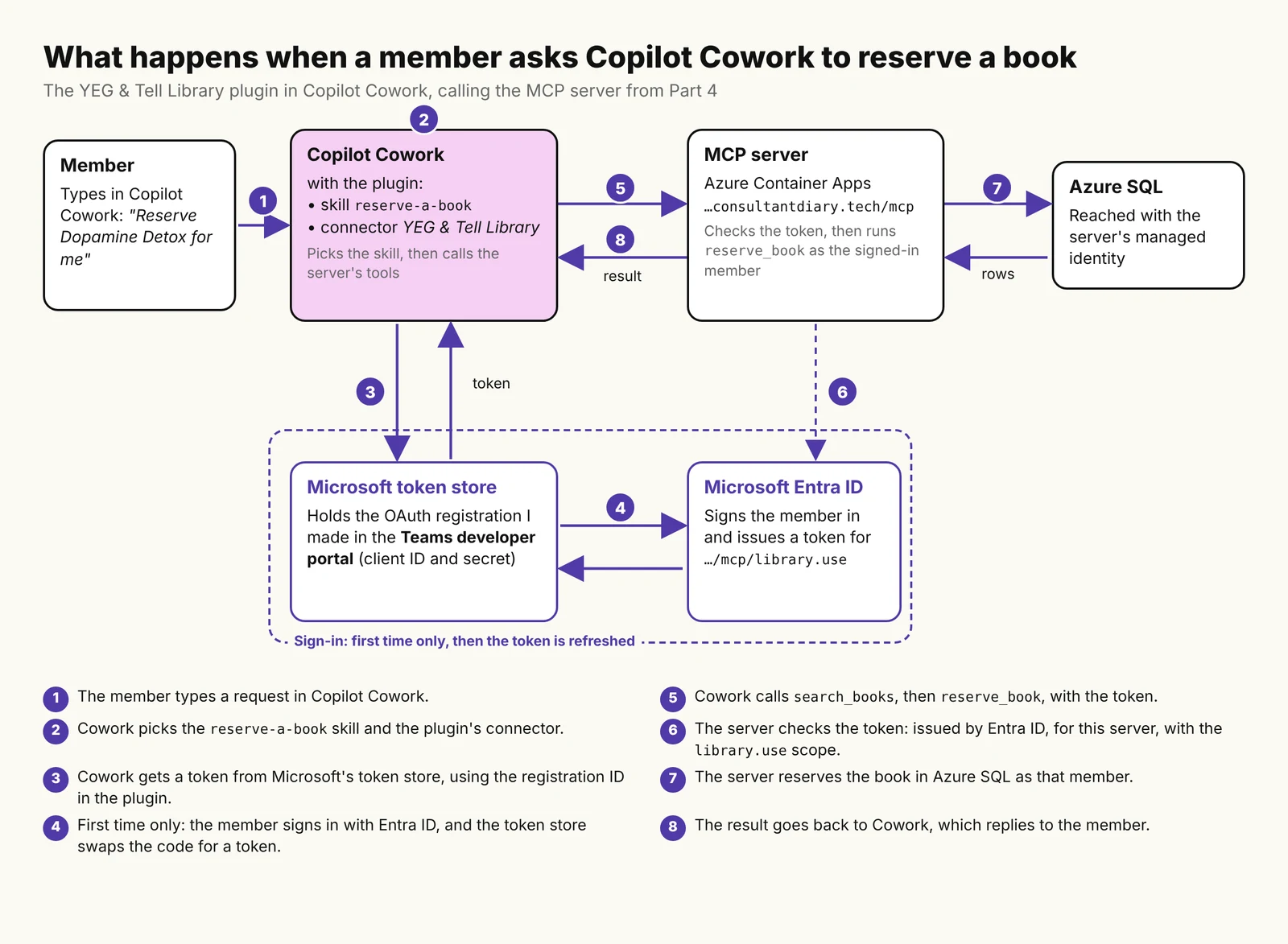
This series started with a Copilot Cowork plugin. I was building one and found that, to reach the data it needed, Cowork expected an MCP server. The YEG & Tell Library, a fictional library, now has one: it runs in Azure and signs people in with Microsoft Entra ID (Part 4).
In this post, I turn that server into a Copilot Cowork plugin: the skills, the sign-in, the package, and what happened when I tested it. Claude and ChatGPT come in Parts 6 and 7.
The full code is in a private GitHub repo; if you’d like access, reach out to me on LinkedIn.
TL;DR
- A Copilot Cowork plugin is a .zip with a manifest, skills and a connector that points at your MCP server. Cowork finds the tools itself.
- With Entra ID sign-in, you register the plugin twice: as an app in Entra ID, and as an OAuth client in the Teams developer portal. The registration ID goes in the manifest.
- Skills tell the model how to use the tools. Cowork’s docs don’t list MCP prompts or resources, so I covered those with skills too.
- Gotcha: a cold start (the server and a paused database) was too slow for Cowork’s first call.
In this post
What’s in a Cowork plugin
Microsoft’s Build plugins for Copilot Cowork guide describes a plugin as a .zip with three parts:
manifest.json, which lists the skills and the connector- skills: one folder each, with a
SKILL.mdfile of instructions for the model - a connector: your MCP server’s URL and how to sign in to it
You don’t describe the tools. The Manage plugins page says Cowork “calls initialize and tools/list at runtime to discover available tools automatically”. The same page lists what Cowork supports from MCP: the tool calls and authentication. Prompts and resources aren’t on the list, so I didn’t count on the server’s recommend_books prompt or its two resources reaching Cowork.

Step 1: Write the skills
Cowork can call the four tools without skills. The skills are where I tell the model how the library works. I wrote one per job a member would ask for:
| Skill | What it covers | Tools it uses |
|---|---|---|
| find-a-book | Searching the catalogue, one book’s details | search_books, get_book_details |
| reserve-a-book | Finding the right book and reserving it | search_books, get_book_details, reserve_book |
| check-my-loans | Loans, due dates, late books | get_my_loans |
| recommend-books | Five available books for a genre and reading level | search_books, get_book_details |
| library-info | Loan period, limits, late fees, programs | None |
The model reads each skill’s description to decide when to use it, so I put the phrases a member would type in it. The name must match the folder name. This is the top of reserve-a-book:
---
name: reserve-a-book
description: |
  Reserves a book for the signed-in library member.
  Use when the member says "reserve Dopamine Detox for me", "put a hold on this
  book", "I want to borrow this one", or "book it for me", including after a
  search or a recommendation.
---
Two of the skills cover what Cowork may not read from the server. recommend-books does the job of the recommend_books prompt from Part 3, and library-info carries a copy of the borrowing policy and programs, which the server publishes as resources. The catch with the copy is that it can go out of date.
Writing the skills also showed me a gap: no tool lists or cancels a reservation. A skill can’t add a tool, so the skills tell the model to say so instead of promising it.
Step 2: Set up sign-in
The connector doesn’t hold any credentials. It holds the ID of an “auth config” that Microsoft keeps in its token store. Microsoft’s OAuth 2.0 page is clear about Entra ID: “Dynamic client registration isn’t available”, and “The agentConnectors node has no Microsoft Entra authorization type.” So, as in Part 4, the client has to be registered up front, in two places.
In Entra ID
- A new app registration for Cowork, single tenant, with a Web redirect URI:
https://teams.microsoft.com/api/platform/v1.0/oAuthRedirect - The delegated
library.usepermission of the server’s app registration - On the server’s app registration, the new app added as an authorized client, as I did for VS Code in Part 4, so members aren’t asked to consent
- A client secret
In the Teams developer portal
Under Tools > OAuth client registration:
| Field | Value |
|---|---|
| Base URL | https://mcp.consultantdiary.tech/mcp |
| Restrict usage by Teams app | Any Teams app |
| Client ID and secret | From the new app registration |
| Authorization endpoint | https://login.microsoftonline.com/<tenant-id>/oauth2/v2.0/authorize |
| Token and refresh endpoints | https://login.microsoftonline.com/<tenant-id>/oauth2/v2.0/token |
| Scope | https://mcp.consultantdiary.tech/mcp/library.use, offline_access |
| PKCE | On |
- Any Teams app: Microsoft warns that if you bind the registration to one app, “every tool call returns a 404 error”.
- PKCE: Microsoft’s page says “It’s on by default”. On my form it was off, so check it.
- The registration ID you get after saving goes in the manifest. When I decoded mine, it held my tenant ID, so I keep the built package out of the repo.
Step 3: Build the package and upload it
I wrote the skills in a folder laid out as a Claude Code plugin, because I’ll need that in Part 6. The Microsoft 365 Agents Toolkit CLI (version 1.1.18 in my case) turns it into a Cowork package:
atk import openplugin --path ./plugin --output ./cowork-build `
    --privacy-url <privacy-url> --terms-url <terms-url> `
    --default-auth-type OAuthPluginVault
The import left a placeholder referenceId on the connector, which you replace with the registration ID:
"remoteMcpServer": {
    "mcpServerUrl": "https://mcp.consultantdiary.tech/mcp",
    "authorization": {
        "type": "OAuthPluginVault",
        "referenceId": "<oauth-client-registration-id>"
    }
}
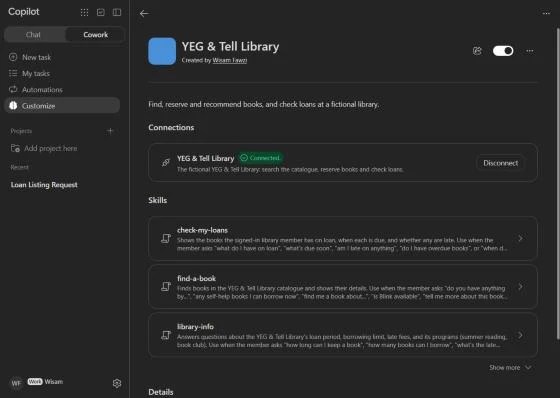
Then atk package builds the .zip. To upload it, Microsoft’s docs point to a Plugins tab with Add plugin. My Cowork had Customize > Add > Upload instead. After the upload, I selected the connector, signed in, and it showed Connected.
What testing showed
The first call failed on a cold start
My first question, “list my loans”, picked the right skill, but Cowork said the plugin “couldn’t be reached”. The server’s log in the Azure portal showed why. The container was starting from zero, Cowork’s token was valid, and then the first database call failed with TaskCanceledException: A task was canceled. while the database woke up from auto-pause.

As I wrote in Part 4, the server checks the member on every request, so the first request of any kind wakes the database. Part 4 measured about 27 seconds for the container alone, and Microsoft asks for “Less than 30 seconds per tool call”. Three minutes later, with both awake, the same question worked in 310 ms. The same thing happened when I came back later to test a reservation: the first try failed, and the second one, a minute later, worked.
The test questions
I asked each question in a new chat, signed in as myself. Cowork shows which skill and tools it used, but not the arguments, and my server doesn’t log them.
| Question | What Cowork used | Reply (quoted) | Result |
|---|---|---|---|
| “What do I have on loan?” | check-my-loans; Get my loans | “you don’t have any books on loan” | Pass |
| “Any self-help books I can borrow now?” | find-a-book; Search books | “There are 10 self-help books you can borrow right now” | Pass |
| “Show me self-hlep books” | find-a-book; one Search books call | “Showing 10 of 16”. It fixed the typo itself, as the skill says. | Pass |
| “What’s the late fee?” | library-info; no tool | “$0.25 a day for each book, up to a maximum of $5 per book” | Pass |
| “recommend kids books” | recommend-books; Search books; Get book details | “The library has only four children’s books available” | Partly |
| “Reserve Outliers by Malcolm Gladwell for me.” | reserve-a-book; Search books; Reserve a book (after my approval) | “I’ve reserved Outliers by Malcolm Gladwell (book 19) for you.” | Pass |
| “What books do I have reserved?” | Two steps; the reply says it checked my loans | “I can’t see your reservations” … “check your account on the library’s website” | Partly |
For the reservation, Cowork asked me once, with its own approval card. The card shows the tool’s title from Part 2, “Reserve a book”, and the book ID. Microsoft says this confirmation comes from the tool’s annotations, and that for non-Microsoft MCP servers it “is being rolled out progressively”; in my tenant, it was already there. The model didn’t ask me first, which is what the skill says to do when the member names one book. It also didn’t make up pickup details: “The library system didn’t give any pickup details, so check with library staff”.

The late fee is a good example of a skill helping. In Part 3, Claude couldn’t answer it unless I attached the policy resource. Here, library-info answered from its copy with no tool call.
The two misses are worth knowing. “recommend kids books” returned only the four books in the children genre. The catalogue also has six children’s fiction books (age group Children), and none came up. I can’t see the arguments, but those four books point to a genre search. And for reservations, the model said it can’t see them, as the skill asks, then suggested a library website that doesn’t exist.

What’s next
In Part 6, we connect the same server to Claude. The plugin folder from this post is already a Claude Code plugin, so the main work is another client registration in Entra ID. You can follow the series on the MCP series page.
Sources
- Microsoft Learn: Build plugins for Copilot Cowork
- Microsoft Learn: Manage plugins for Copilot Cowork
- Microsoft Learn: Configure authentication for MCP and API plugins
- Microsoft Learn: Configure OAuth 2.0 authentication
A note on how this post was written: the experience, examples and voice are mine. The writing was enhanced with the help of AI.

Leave a Reply