In Part 1, we covered what MCP is, how hosts, clients and servers fit together, and when it makes sense to build your own MCP server. This post is about design: how to shape the tools, resources and prompts your server offers so AI apps use them well.
We’ll keep the same example: the YEG & Tell Library, a fictional library with an Azure SQL database of books. The code is in C# with the official MCP C# SDK, and everything reflects the MCP specification version 2026-07-28. There’s no shortage of opinions on MCP design, so the advice here comes from Anthropic’s and OpenAI’s guidance, the MCP and Microsoft documentation, and my own experience. The sources are listed at the end.
TL;DR
- Design your MCP server’s tools around the tasks users want done, not around your database or API.
- Keep tools few and distinct, with clear names, descriptions and inputs.
- Return only what the model needs, and write errors that explain the fix.
- Mark which tools change data, so the AI app can ask before acting.
- Use resources for reference content, and treat prompts as a bonus.
In this post
Tool, resource or prompt?
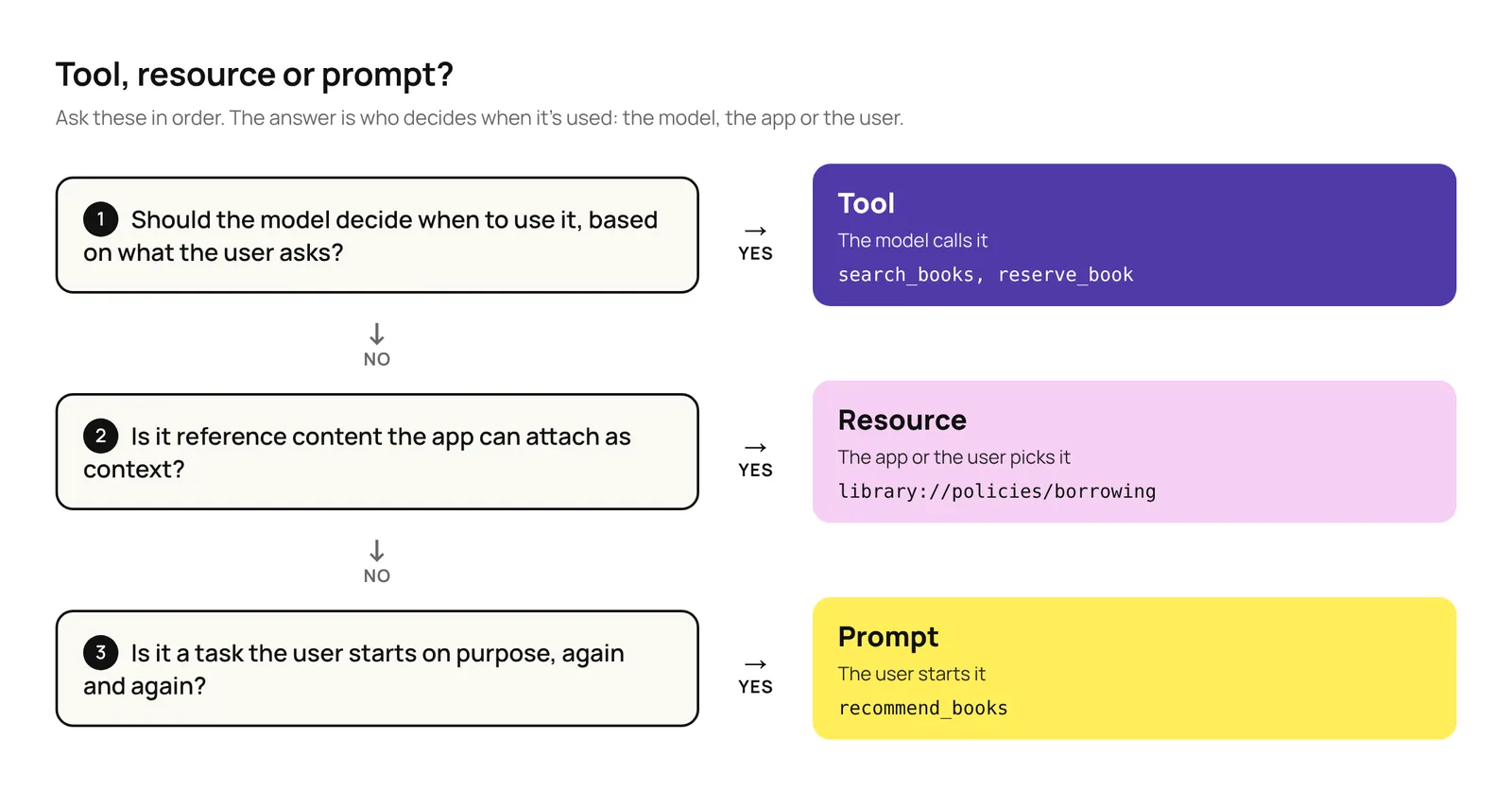
The difference is who decides when each one is used: the model, the app or the user. Figure 1 turns that into three questions. Most of the design work is in the tools, so that’s where most of this post goes.

How to design tools
The model picks a tool by reading its name, description and inputs, then works with whatever the tool returns. Good tool design makes both of those easy.
Where I started
I was designing an MCP server for a Copilot Cowork plugin, and my first instinct was to give the model my system’s API documentation as a Markdown file, let it build the API calls itself, and have the server simply pass them on. It’s possible, and in Cowork the documentation could even live in a skill that only loads when it’s needed. But it creates a few problems:
- Every API call is written from scratch. The model often gets it right, but not always. When the API returns an error, the model may try again, and every attempt costs tokens and adds to the context. When a mistake doesn’t cause an error, like a misspelled filter the API quietly ignores, the user gets a wrong answer and nobody notices.
- The documentation fills the context. Whatever part of the API reference gets loaded stays in the context window. That leaves less room for the conversation, makes every turn slower and more expensive, and makes it harder for the model to recall what matters.
- Approvals become all or nothing. The server sets annotations per tool, so one generic tool gets one setting for every call, and an app like Cowork follows it. If the server marks it
ReadOnly = true, Cowork never asks, even before a delete. If it marks itReadOnly = false, Cowork asks for approval, even for a simple search. - The server has to check everything. The model can call any endpoint, so the server must check every call, such as whether the user is allowed to make it.
Letting the model write the request isn’t always wrong, though. Later in this post, we’ll look at a Fabric data agent that does exactly that and works well, because of what’s built around it.
Common anti-patterns, and what to do instead
Each anti-pattern below has three parts: what it looks like, what to do instead, and why.
1. The wrong tools
One tool per API endpoint or table
- Anti-pattern: A
list_bookstool that returns the whole catalogue to answer “Do you have any self-help books?” - Instead:
search_books, which returns only the matches. - Why: APIs are built for developers, whose code can loop through thousands of records at no cost. A model can’t: everything a tool returns lands in its limited context window, and reading it costs time and money.
Overlapping tools
- Anti-pattern:
search_books_by_title,search_books_by_authorandsearch_books_by_genre. - Instead: One
search_bookswith optional filters. OpenAI’s rule of thumb is to have fewer than 20 tools available at a time. - Why: Near-identical tools make the model choose between them every time. As OpenAI’s guide to building agents puts it, the issue “isn’t solely the number of tools, but their similarity or overlap.”
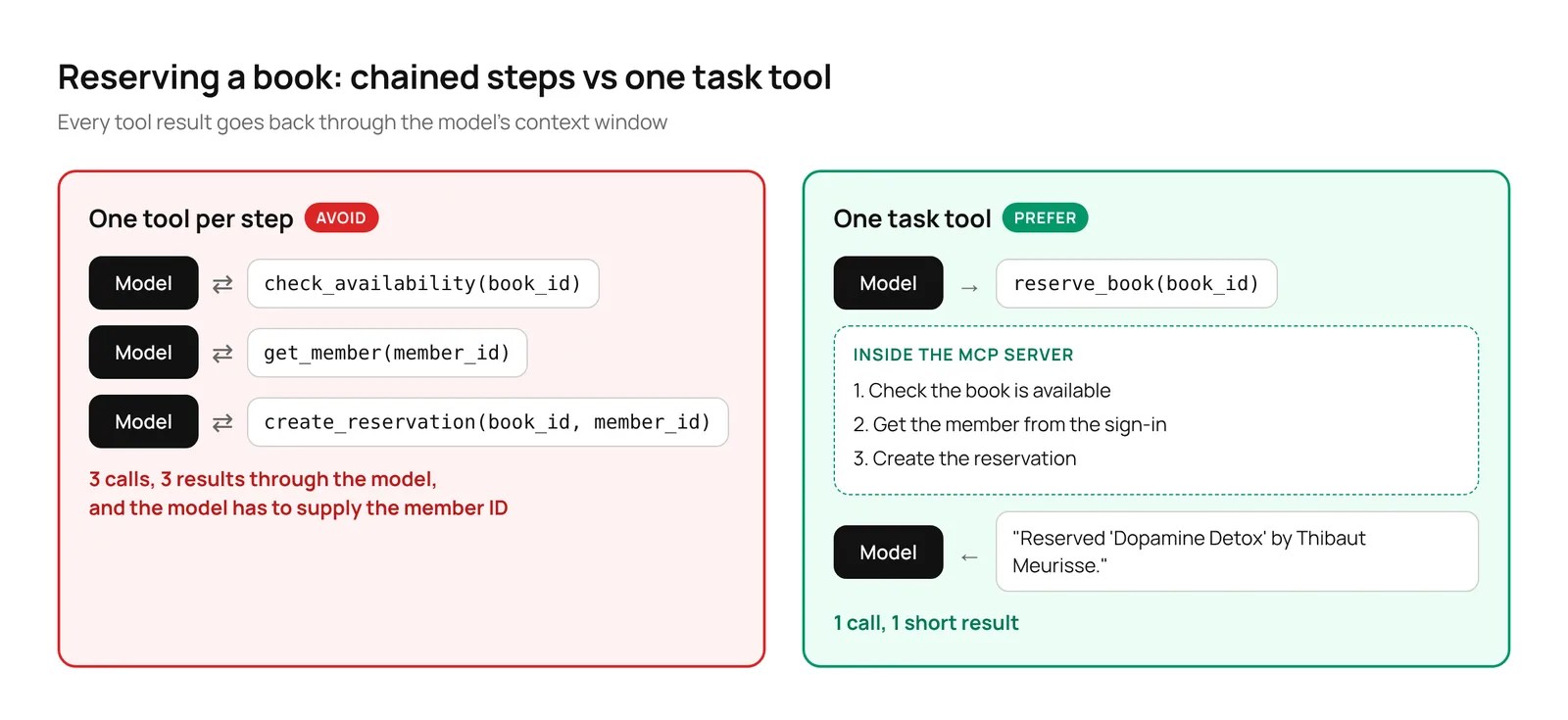
Chained simple steps
- Anti-pattern: Reserving a book with
check_availability, thenget_member, thencreate_reservation. - Instead: One
reserve_booktool that does all three on the server (Figure 2). - Why: Three calls mean three chances to go wrong, and every result passes through the model.
2. Confusing inputs
Asking for what your code already knows
- Anti-pattern: A tool that asks for a
member_id. - Instead: Take the member from the sign-in.
- Why: The model has to find the ID or guess it. Taking it from the sign-in is safer too: the model can’t reserve a book for someone else.
Vague names, descriptions and inputs
- Anti-pattern: A tool called
bookswith a one-line description and inputs namedqands. - Instead: Describe each tool as you would to a new team member, use unambiguous names, like
textinstead ofq(Anthropic’s example isuser_idinstead ofuser), and use enums, a fixed list of allowed values. - Why: The name, description and inputs are all the model has to go on. A
statusinput that only acceptsAvailable,OnLoanorReservedcan’t receive “checked out”.
Figure 3 shows the difference in code. Both versions do the same search; only what the model can read changes.

3. Noisy outputs
Dumping raw data
- Anti-pattern: Returning full database rows, with internal codes and dozens of columns (Figure 4).
- Instead: Return only the fields the model needs, cap the results, say how many matched in total, and let the model ask for the next page. For
search_books, that’s the ID, title, author and status of up to 10 books per page. - Why: Everything a tool returns fills the context window, and noise makes it harder for the model to find what matters.

Unhelpful errors
- Anti-pattern: An error code like “ERR 4031”.
- Instead: Say what went wrong and how to fix it, like “Unknown genre ‘self-hlep’. Valid genres are business, history and self-help.”
- Why: An error code leaves the model stuck. A clear message lets it correct itself and try again.
4. Hidden risk
Not saying which tools change data
- Anti-pattern: Tools with no annotations, so the AI app can’t tell a search from a reservation.
- Instead: Use MCP’s tool annotations. Mark
search_booksas read-only, and letreserve_bookshow that it changes data. - Why: The AI app needs to know which tools only read and which change things, so it can ask the user before acting. Cowork, for example, asks the user to confirm any tool that isn’t marked read-only, and treats tools with no annotations as destructive.
The recommended pattern: task-based tools
Build a few tools, one for each task a user actually wants done. Each tool:
- ✓ Does the whole task in one call, on the server.
- ✓ Takes only what the user knows, and gets the rest from the sign-in or the app.
- ✓ Has a clear name, a clear description, and enums for fixed values.
- ✓ Returns only what the model needs, capped, with a total.
- ✓ Returns errors that say how to fix the problem.
- ✓ Is annotated, so the AI app knows whether it only reads or changes data.
For YEG & Tell, that comes down to four tools:
| Tool | What it does | Changes data? |
|---|---|---|
search_books | Finds books by title, author, genre, status or age group. Returns up to 10 matches per page with ID, title, author and status. | No |
get_book_details | Returns the full details for one book. | No |
reserve_book | Checks availability and reserves the book for the signed-in member, in one step. | Yes |
get_my_loans | Lists the signed-in member’s current loans and due dates. | No |
Here’s search_books with the C# SDK. LibraryDb is a small class that talks to Azure SQL; we’ll write it in Part 3.
[JsonConverter(typeof(JsonStringEnumConverter<BookStatus>))]
public enum BookStatus { Available, OnLoan, Reserved }

[JsonConverter(typeof(JsonStringEnumConverter<AgeGroup>))]
public enum AgeGroup { Children, Teen, Adult }

public record BookSummary(int Id, string Title, string Author, BookStatus Status);
public record SearchResult(IReadOnlyList<BookSummary> Books, int TotalMatches);

[McpServerToolType]
public static class LibraryTools
{
    [McpServerTool(Name = "search_books", Title = "Search books",
        ReadOnly = true, OpenWorld = false)]
    [Description("Searches the library catalogue by title, author, genre, " +
        "status or age group. Returns up to 10 books per page with their ID, " +
        "title, author and status, plus the total number of matches. Use the " +
        "ID with get_book_details or reserve_book.")]
    public static async Task<SearchResult> SearchBooks(
        LibraryDb db,
        [Description("Words from the title or author, such as 'gladwell'.")]
        string? text = null,
        [Description("A genre, such as 'self-help'.")]
        string? genre = null,
        [Description("Only return books with this status.")]
        BookStatus? status = null,
        [Description("Only return books for this age group.")]
        AgeGroup? ageGroup = null,
        [Description("The page of results to return, starting at 1. Ask for " +
            "the next page when totalMatches is higher than the books " +
            "returned so far.")]
        int page = 1,
        CancellationToken ct = default)
    {
        if (genre is not null && !await db.GenreExistsAsync(genre, ct))
        {
            var genres = string.Join(", ", await db.GetGenresAsync(ct));
            throw new McpException(
                $"Unknown genre '{genre}'. Valid genres are: {genres}.");
        }

        return await db.SearchBooksAsync(text, genre, status, ageGroup,
            page, pageSize: 10, ct);
    }
}
Most of the fixes show up in these few lines:
- The descriptions tell the model what each input means and how the tools connect: search first, then reserve.
- The enums and their JSON converters make the model see
Available,OnLoanandReserved, andChildren,TeenandAdult, instead of numbers. - The result is capped at 10 books per page, with four fields each, plus the total number of matches, so the model can ask for the next page.
- The error explains the fix. The SDK passes an
McpExceptionmessage back to the model, so don’t put sensitive details in it. - The genre is the one input that isn’t an enum, on purpose. Genres live in the database and can change, so the server checks the value and, if it’s wrong, returns an error listing the valid ones.
- The annotations describe how the tool behaves.
ReadOnly = truetells the AI app that searching only reads data.OpenWorld = falsesays the tool only works with YEG & Tell’s own database, not an open-ended set of outside systems like the web. In the SDK,OpenWorlddefaults totrue, so it’s worth setting.
And here’s the part of reserve_book that matters most for design:
[McpServerTool(Name = "reserve_book", Title = "Reserve a book",
    ReadOnly = false, Destructive = false, OpenWorld = false)]
[Description("Reserves a book for the signed-in member. Checks that " +
    "it's available first. Find the book ID with search_books.")]
public static async Task<string> ReserveBook(
    LibraryDb db,
    ClaimsPrincipal user,
    [Description("The book ID returned by search_books.")]
    int bookId,
    CancellationToken ct = default)
{
    // The member comes from the sign-in, never from the model.
    var memberId = user.FindFirst(ClaimTypes.NameIdentifier)?.Value
        ?? throw new McpException(
            "You need to be signed in to reserve a book.");

    // LibraryDb checks availability and creates the reservation (Part 3).
    return await db.ReserveAsync(bookId, memberId, ct);
}
The SDK passes the signed-in user in as a ClaimsPrincipal, so the model never sees or supplies a member ID. ReadOnly = false says the tool changes data. It’s the SDK default, but setting it makes the intent clear. Destructive defaults to true, so reserve_book sets it to false: it adds a reservation but doesn’t delete or overwrite anything. Because it isn’t read-only, the AI app can ask before reserving.
Figure 5 shows what that looks like for a user in Copilot Cowork. The model finds the book with search_books without asking, then stops for approval before reserve_book runs, because reserve_book has ReadOnly = false. Cowork asks for approval whenever a tool isn’t marked read-only or is marked destructive, and uses the tool’s Title as the heading of the approval card. The approval card shows a single input, the book ID, because the member comes from the sign-in.

When the model should write the query
A few weeks before writing this post, I was building a Fabric data agent. The agent doesn’t have a separate tool for each question. It has one general tool, which Microsoft calls the DAX generation tool, that writes a DAX query from the user’s question and the semantic model. Thinking back to it while writing this section, that sounds a lot like my first instinct, and like the Vague names, descriptions and inputs anti-pattern: the model has to work out what each table, column and measure means. So why does it work?
Because the semantic model does the job that good tool design does. Microsoft says the DAX generation tool relies only on the semantic model’s metadata and its Prep for AI setup:
- The semantic model’s own metadata, such as clear names for tables, columns and measures, their descriptions and synonyms, tells the agent what everything means. Microsoft’s example: names like
TR_AMTorDIM_GEO_01give the tool no context, whileTotal Revenuedoes. - Prep for AI adds three things on top of the model: an AI data schema that limits which tables, columns and measures the agent can see, AI instructions, and verified answers, which are approved examples that guide the query.
And analytics questions, like “revenue by region last quarter, excluding returns”, are too open-ended to build a tool for each one.
The anti-pattern is the bare version: a generic run_sql tool pointed straight at a transactional database, with cryptic column names, no descriptions, no limits and write access. For YEG & Tell, that means a split. Reserving a book stays a task tool. A question like “How many self-help books were borrowed last month?” could go to a read-only query tool that runs against a curated, well-described view of the database, using an account that can only read.
When you grow
Search and fetch. ChatGPT’s deep research and company knowledge features expect two read-only tools: search, which takes a query and returns results with an ID, title and URL, and fetch, which returns the full content for one ID. Our search_books and get_book_details already follow the same idea, and we’ll come back to them in Part 7.
Many servers, many tools. When an AI app is connected to many MCP servers, the tool definitions alone can fill a big part of the context window. Anthropic’s answer is code execution with MCP: the agent finds only the tools it needs and calls them from code, filtering results before they reach the model. In their example, token use dropped from about 150,000 to about 2,000, at the cost of running agent-written code in a secure sandbox. OpenAI’s tool search does something similar by loading tools only when they’re needed. YEG & Tell is far too small to need either.
How to design resources
Resources are read-only content the AI app can attach as context. The model doesn’t call them; the app or the user picks them, often from a menu. Each resource has a URI. A direct resource has a fixed URI, like library://policies/borrowing. A resource template has parameters, like library://programs/{programId}, so one definition covers every program.
- Use resources for reference content that doesn’t depend on what the user asks: policies, program descriptions, the list of genres.
- Use a tool when the content depends on the request. If it needs search criteria, like finding books, it’s a tool.
- Give each resource a name, title, description and MIME type, so the app can show it in a menu and the model knows what it’s reading.
- Keep URIs readable.
library://programs/summer-readingtells you what it is. - Don’t rely on resources alone. Support varies between AI apps, and at the time of writing, Microsoft’s Cowork plugin documentation covers tools only. And where they are supported, the app decides how they’re used: in Claude, for example, the user attaches them from a menu. If the content matters, also offer it through a tool. For YEG & Tell, that would mean adding a
get_policytool to the four above.
[McpServerResourceType]
public static class LibraryResources
{
    [McpServerResource(UriTemplate = "library://policies/borrowing",
        Name = "borrowing_policy", Title = "Borrowing policy",
        MimeType = "text/markdown")]
    [Description("Loan periods, borrowing limits and late fees.")]
    public static Task<string> BorrowingPolicy(
        LibraryDb db, CancellationToken ct) =>
        db.GetPolicyAsync("borrowing", ct);

    [McpServerResource(UriTemplate = "library://programs/{programId}",
        Name = "library_program", Title = "Library program",
        MimeType = "text/markdown")]
    [Description("Details of a library program, such as summer-reading.")]
    public static Task<string> LibraryProgram(
        LibraryDb db, string programId, CancellationToken ct) =>
        db.GetProgramAsync(programId, ct);
}
The first is a direct resource. The second is a template: the SDK fills programId from the URI the app asks for.
Figure 6 shows the borrowing policy in use in Claude, which supports resources. The user attaches it from a menu, and the model answers from it without calling a tool.

How to design prompts
Prompts are templates the user starts on purpose, from a menu or as a slash command, depending on the app. They package a task users repeat, and they show the model how to use your tools for it.
- Build prompts for repeatable tasks, not one-offs.
- Keep arguments few and clear, and describe each one. Apps build a form from them: Claude, for example, labels each field with the argument’s name and uses its description as the hint, so
levelreads better thanreadingLevel. Prompt arguments are always passed as text, so you can’t use an enum like you can for a tool input; list the allowed values in the description instead, asleveldoes. - Name the tools the prompt should use, so the model follows the path you intended.
- Don’t count on prompts to fix weak tools. The user picks a prompt now and then; the model reads your tool descriptions every time.
- Treat them as a bonus. Like resources, support varies, and Cowork’s plugin documentation covers tools only.
[McpServerPromptType]
public static class LibraryPrompts
{
    [McpServerPrompt(Name = "recommend_books", Title = "Recommend books")]
    [Description("Suggests available books in a genre for a reading level.")]
    public static string RecommendBooks(
        [Description("A genre, such as self-help.")]
        string genre,
        [Description("Reading level: children, teen or adult.")]
        string level) =>
        $"Use search_books to find available {genre} books. " +
        $"Pick five suited to {level} readers and explain " +
        "each pick in one sentence. Then offer to reserve one " +
        "with reserve_book.";
}
Figure 7 shows recommend_books in Claude. The user picks it, fills in the two arguments, and Claude attaches the filled-in text to the message. Once it’s sent, the model follows it to search_books.

We now have three classes: LibraryTools, LibraryResources and LibraryPrompts. The SDK finds them through their [McpServerToolType], [McpServerResourceType] and [McpServerPromptType] attributes, so registering all three takes a few lines when we set up the server in Part 3:
builder.Services.AddMcpServer()
    .WithHttpTransport()
    .WithToolsFromAssembly()
    .WithResourcesFromAssembly()
    .WithPromptsFromAssembly();
Test your design
Before building anything else, try your design with realistic questions and read what the model does with them: which tool it picks, what it sends and what comes back. Small changes to names and descriptions often make a big difference. For YEG & Tell, I’d start with these:
| Ask | What should happen |
|---|---|
| “Do you have anything by Malcolm Gladwell?” | search_books with the text “gladwell” |
| “Any self-help books I can borrow now?” | search_books with the genre “self-help” and the status Available |
| “Reserve Dopamine Detox for me.” | search_books to find the ID, then reserve_book, with approval asked in apps that use the annotations, such as Cowork |
| “Show me self-hlep books.” | An error listing the valid genres, then a retry with “self-help” |
| “What’s the late fee?” (with the borrowing policy attached) | An answer from the attached policy, with no tool call |
When the model picks the wrong tool or sends the wrong input, the fix is usually a clearer name or description. In Part 3, we’ll run these against the real server.
Design checklist
Here’s every anti-pattern from this post in one place, with what to do instead.
| Avoid | Do instead |
|---|---|
| One tool per API endpoint or table | Tools built around tasks, like search_books |
| Overlapping tools | One tool with optional filters, and fewer than 20 tools |
| Chained simple steps | One tool that does the whole task, like reserve_book |
| Asking for what your code already knows | Take it from the sign-in or the app |
| Vague names, descriptions and inputs | Clear descriptions, unambiguous names and enums |
| Dumping raw data | Only the fields the model needs, capped, with a total |
| Unhelpful errors | Errors that say what went wrong and how to fix it |
| Not saying which tools change data | Tool annotations: ReadOnly, Destructive and OpenWorld |
| Relying on resources and prompts alone | Offer anything important through a tool too |
What’s next
In Part 3, we build the YEG & Tell MCP server in C# on Azure SQL and test it. In Part 4, we’ll deploy it to Azure and add sign-in with Microsoft Entra ID. After that, we’ll connect it to three AI apps, each with its own plugin: Copilot Cowork in Part 5, Claude in Part 6 and ChatGPT in Part 7. You can follow the whole series on the MCP series page.
Get the next part by email
New posts in the MCP series and on AI, agents and Power Platform, straight to your inbox. No spam, unsubscribe anytime.
Sources
- Anthropic: Writing effective tools for AI agents, using AI agents
- Anthropic: Code execution with MCP
- Anthropic: Effective context engineering for AI agents
- OpenAI: Function calling guide
- OpenAI: A practical guide to building agents
- OpenAI: Building MCP servers for plugins and API integrations
- MCP: Understanding MCP servers
- MCP C# SDK documentation
- Microsoft Learn: Fabric data agent with semantic models
- Microsoft Learn: Build plugins for Copilot Cowork
A note on how this post was written: the experience, examples and voice are mine. The writing was enhanced with the help of AI.

Leave a Reply